
The Division of IT will issue an automated update to WCU-owned Windows computers on Thursday, September 27, 2012 between 11:00am and 1:00pm. This update will upgrade Symantec Endpoint Clients to the latest version, 12.1.
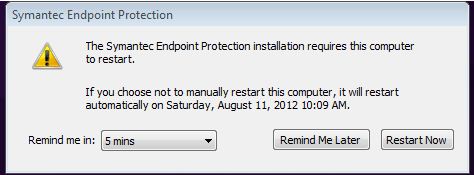
You will be prompted to reboot your computer. Installation will occur remotely, and once it is finished, it will require a restart. A pop-up window like the one below will appear. We suggest restarting your computer as soon as possible; however you will be able to postpone the restart until later the same day.
Intrustion Prevention System (IPS)
After your computer updates to Symantec Endpoint Protection 12.1 you may see this message at the bottom of your Internet Explorer 9 browser window when you first launch it:

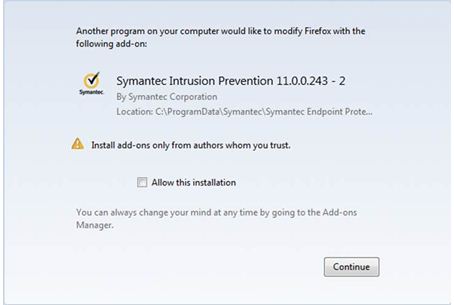
Firefox users may see the following message when first launching Firefox after the update:
What is it?
IPS technology prevents malicious files from getting to your hard drive in the first place. Unlike antivirus, which looks for known malicious files, IPS scans the network traffic stream in order to find threats using known exploits and attack vectors. IPS does not detect specific files, but rather specific methods that can be used to get malicious files onto your network. This allows IPS to protect against both known and unknown threats, even before anti -virus signatures can be created for them. IPS is very good at detecting “drive-by” downloads of malware and fake antivirus scanner web pages, which Auto-Protect cannot prevent. In today’s complex threat environment, this technology is an effective complement to antivirus technology, and its usage should be considered a necessity on any network that is connected to the Internet.
So, should I click “Enable” or “Allow this installation?
Yes!
What if I accidentally clicked “Don’t enable” in Internet Explorer?
- Open Internet Explorer 9
- Click the gear icon (in the top right)
- Click “Manage add-ons”
- Click “Symantec Intrusion Prevention”
- Click “Enable”
What if I accidentally did not click “Allow this installation” in Firefox?
- Open Firefox
- Click Tools, Add-ons
- Click “Symantec Intrusion Prevention”
- Click “Enable”
To check what version of Symantec Endpoint Protection you are running:
- Open Endpoint Protection client by selecting Start > All Programs > Symantec Endpoint Protection > Symantec Endpoint Protection
- Click Help
- Click About…
- The version number, 12.1.1101.401 (or newer) will be listed under Symantec Endpoint Protection after the upgrade.
If you have any questions or issues with the anti-virus update, contact the IT Help Desk. The IT Help Desk can be reached by phone locally at 227-7487 or toll free at 866-928-7487, via e-mail at ithelp@wcu.edu, or via the Online Help Desk at http://ithelp.wcu.edu/.